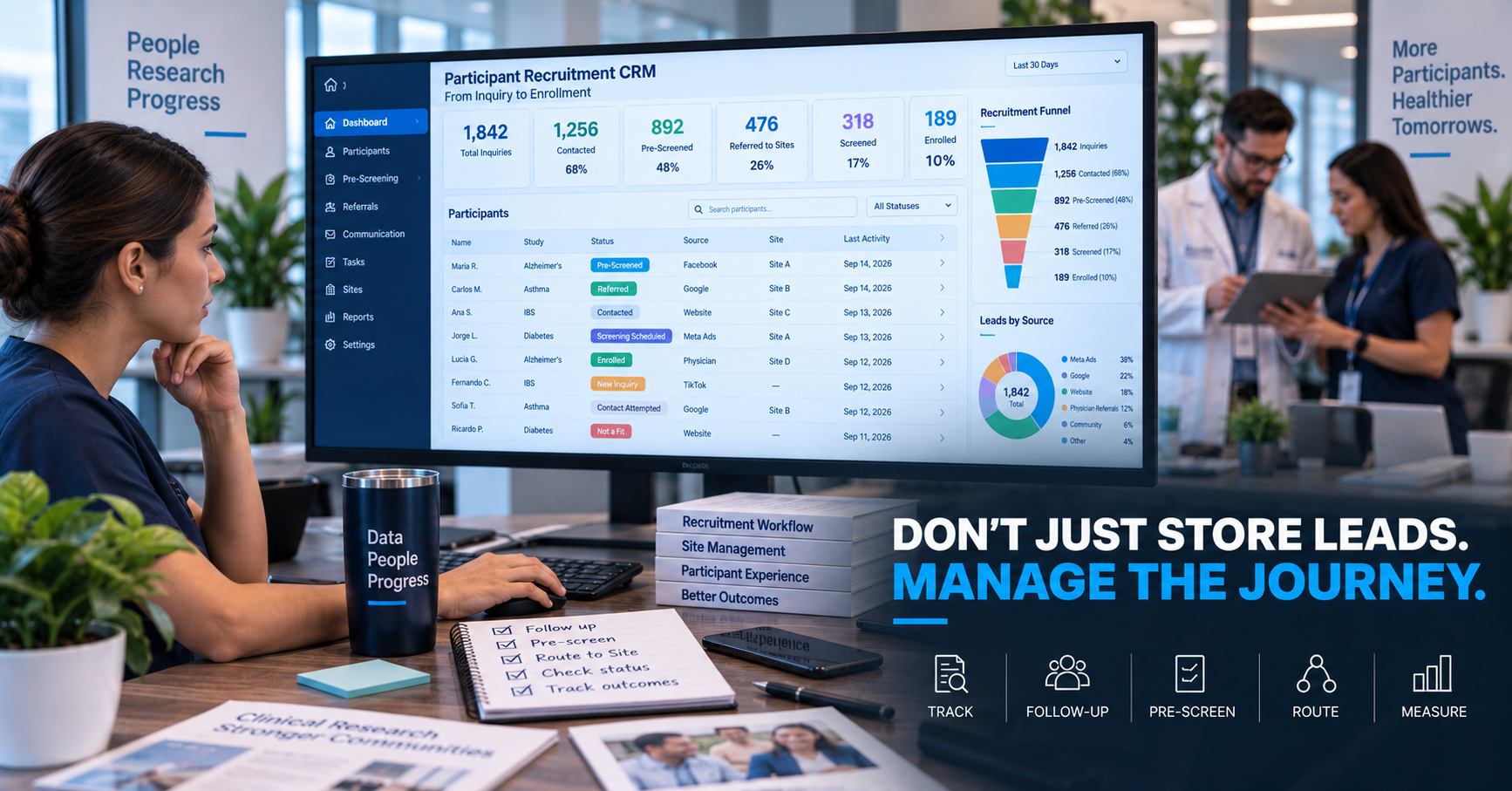
A Research Site generates participant inquiries from Meta Ads, Google, its own website, physician referrals, community outreach, Site databases, and centralized CRO campaigns. Then the information starts spreading. Some leads sit in email. Others live in spreadsheets. Others are inside Meta itself. A coordinator keeps notes in another system, and a recruiter tracks calls manually. When the Site Director asks “what happened to the 120 participants we received last month?”, nobody can answer without opening several files.
That is the problem a clinical trial recruitment CRM should solve. But not every CRM is suitable for clinical research. A generic sales CRM may be excellent at tracking Lead → Opportunity → Customer. Clinical research requires a different workflow: Inquiry → Contact → Pre-Screen → Referral → Site Screening → Enrollment. The technology needs to understand that difference.
What Is a Clinical Trial Recruitment CRM?
A recruitment CRM is a system used to organize and manage prospective participants as they move through the recruitment process. Its purpose is not to determine clinical eligibility — its purpose is to provide operational visibility. A useful recruitment CRM helps teams understand where a participant came from, when they registered, whether they were contacted, whether pre-screening was completed, what the next step is, which Site owns the referral, and what eventually happened. In simple terms, it should make the recruitment funnel visible.
A Recruitment CRM Is Not Just a Contact Database
A spreadsheet can store a name, an email, and a phone number. That does not make it a recruitment management system. The value of a CRM comes from the workflow built around the participant. Consider a participant who registers at 8:43 PM: the CRM records a New Inquiry, an automatic confirmation goes out, a pre-screen link is delivered, the participant completes the questions, a recruiter is assigned, a human review is completed, a referral is sent to the Research Site, and the Site updates the screening outcome. Now the CRM is doing more than storing a phone number — it is managing a process.
CRM and CTMS Are Not the Same Thing
Research organizations sometimes use these terms interchangeably, but they serve different functions. A Clinical Trial Management System generally supports broader Study operations such as Study management, Site management, milestones, monitoring, regulatory documentation, finances, visit tracking, and Study-level operations. A recruitment CRM focuses more specifically on the prospective participant journey — inquiries, communication, pre-screening, referrals, routing, participant status, and campaign attribution.
There may be overlap, and some systems provide functionality from both categories. The important question is not “what is the software called?” It is “can the system manage the workflow we actually need?”
The First Requirement: One Participant Record
A Site should be able to open one participant profile and understand the recruitment history. That record may include name, contact information, preferred language, location, Study, acquisition source, registration date, pre-screen status, communication history, referral status, Site assignment, and screening outcome. The goal is not to collect unlimited data — it is to create enough continuity that every team member understands who this person is and what happens next.
The CRM Should Track Recruitment Status
Status is one of the most important CRM functions. A useful recruitment pipeline might include New Inquiry, Contact Pending, Contact Attempted, Successfully Contacted, Pre-Screen Started, Pre-Screen Completed, Human Review Required, Potential Referral, Referred to Site, Screening Scheduled, Screened, Enrolled, Unable to Contact, Declined, and Not a Fit. These stages create visibility. Without them, every participant is simply “a lead,” which tells the Site very little.
Status Definitions Must Be Standardized
If one recruiter uses “Qualified” to mean “completed the form” while another uses it to mean “ready for Site screening,” the CRM becomes unreliable. Define each status operationally — for example, New Inquiry means the participant submitted initial contact information; Pre-Screen Completed means the participant completed preliminary recruitment questions; Potential Referral means high-level criteria suggest further evaluation may be appropriate; Referred to Site means participant information has been routed to the Research Site; and Site Screened means protocol-based screening occurred. Clear definitions produce cleaner reporting.
The CRM Should Know Where Every Participant Came From
Attribution matters. A participant record should ideally identify whether the person came from Meta, Google, the website, a physician referral, database outreach, a community campaign, a CRO campaign, or another source. More advanced tracking may include Study, campaign, ad set, creative, language, and geography. Why? Because the recruitment team eventually wants to know which sources produce the strongest referrals and enrollments. Without source attribution, the Site can count leads — it cannot learn from them.
The CRM Should Track Time
Recruitment performance is highly time-sensitive. Important timestamps include registration time, first contact attempt, successful contact, pre-screen completion, referral time, and screening date. This allows measurement of Time to First Contact (how quickly does follow-up begin), Time to Referral (how long does recruitment processing take), and Time to Screening (how quickly does the Site act). Without timestamps, operational delay remains invisible.
Follow-Up Tasks Should Not Depend on Memory
A recruiter should not need to remember “I should call Maria again tomorrow.” The CRM should manage that, through assigned tasks, follow-up dates, reminders, overdue alerts, and participant queues — for example, a queue showing Contact Attempt 1 due today, Contact Attempt 2 due tomorrow, a Human Review Required case, and a Screening Outcome Missing case. This reduces participant opportunities being forgotten simply because staff are busy.
Communication History Should Be Visible
The participant may interact through phone, SMS, email, WhatsApp where appropriate, the website, or a recruitment portal. The CRM should help the team understand what communication has already happened, so a coordinator never has to ask “has anyone spoken with you before?” when another recruiter had a 20-minute conversation yesterday. Integrated communication history supports continuity.
Automated Communication Can Add Value
Not every message needs human intervention. Examples suited to automation include a registration confirmation (“we received your information”), an incomplete pre-screen reminder (“you can continue your questionnaire here”), a contact expectation (“a member of the research team may contact you”), and an appointment reminder (“your screening visit is scheduled for tomorrow”). The All of Us Research Program’s digital research infrastructure, for example, incorporates email and SMS communication linked to participant workflow steps alongside staff-facing participant tracking and dashboards. The principle is useful for Research Sites: automation should support the participant journey, not become the journey.
Human Escalation Must Be Easy
A CRM should recognize when automation reaches its limit — for example, when a participant gives an uncertain answer, asks a Study-specific question, needs language assistance, or reports information requiring clarification. The workflow should move the case to Human Review rather than forcing the participant through an inflexible automated process.
Preliminary Pre-Screening Should Connect Directly to the CRM
Pre-screening becomes much more useful when the responses do not live in a separate form system. Ideally, Registration, Pre-Screen, Results, and Recruitment Status are connected, so the recruiter can see completed answers, incomplete questions, possible mismatches, and cases requiring review. This reduces repeated participant questioning and manual data transfer.
But the CRM Should Not Pretend to Determine Eligibility
This boundary matters. A recruitment CRM may help organize preliminary recruitment fit. It should not automatically present that as final Study eligibility. Formal eligibility may depend on detailed medical review, laboratory values, medications, medical records, investigator assessment, and protocol procedures. Use careful status language — “Potential Referral” is very different from “Qualified Participant.”
Data Collection Should Have a Purpose
Because recruitment may involve sensitive information, CRM design should follow a simple principle: collect what the workflow needs. FDA recruitment guidance specifically highlights questions around personal information collected during basic eligibility contacts, including who handles it, whether third-party marketing companies collect it, what happens to information from non-eligible individuals, and how records are protected. The technology should therefore make it possible to answer what information is being collected, why, who can access it, how long it is retained, and what happens if someone does not continue. A CRM is not an excuse to collect everything available.
Role-Based Access Matters
Not everyone needs access to everything. Possible user roles include recruiter, Research Site coordinator, Site manager, CRO recruitment manager, administrator, and reporting user. Large digital research platforms already use role-based access structures to limit data and workflow visibility according to staff responsibilities — the All of Us Research Platform, for example, uses role/function/permission controls across multiple staff roles. A recruitment system should follow the same basic principle: appropriate access for the appropriate role.
Multi-Site Recruitment Changes CRM Requirements
A CRM serving one Site can be relatively simple. A system serving 20 Sites needs additional capabilities — it should know which Site owns the participant, whether Sites overlap geographically, Site capacity, Study status, referral routing rules, and Site-specific performance. A participant should never end up emailed to three Sites simultaneously simply because nobody knows who owns the referral.
Routing Should Be Built Into the Workflow
Routing may use ZIP code, travel distance, Site territory, preferred language, Study availability, Site capacity, and participant preference. A centralized workflow might move from Participant Registers, to Pre-Screen Completed, to Routing Rules Evaluated, to Site Assigned, to Site Notified, to Participant Status Updated. This can remove a substantial amount of manual coordination.
The CRM Should Track Site Handoff
Referral should not mean “email sent.” It should mean ownership transferred and tracked. The system should be able to distinguish referral created, Site notified, Site opened referral, contact attempted, screening scheduled, and final disposition. This prevents the recruitment funnel from disappearing at the exact moment it reaches the Site.
Site Feedback Is Critical
A recruitment CRM becomes much more valuable when Site outcomes return upstream. Suppose marketing sends 50 referrals, and the Site reports 32 contacted, 18 screened, and 7 enrolled. Now recruitment can learn. Without Site feedback, 50 referrals is the end of the story; with feedback, the organization can compare campaigns, geography, language, vendors, and Sites.
The CRM Should Support Dashboards
Different users need different views. A recruiter dashboard might show new inquiries, overdue follow-ups, incomplete pre-screens, and the human-review queue. A Site dashboard might show new referrals, contact status, screening appointments, and enrollment. A CRO dashboard might show referrals by Site, response time, conversion, capacity, and enrollment velocity. A marketing dashboard might show source, CPL, Cost Per Referral, and campaign conversion. One database can support several perspectives.
Recruitment Dashboards Should Drive Action
The dashboard should answer: what requires attention now? For example — 18 referrals waiting more than 24 hours; Site B has no remaining screening capacity; Spanish referrals have lower contact rates; Meta Campaign C has high CPL but excellent enrollment conversion; 12 participants abandoned pre-screening. That is much more useful than a single line reading “Total Leads: 1,842.”
Search and Filtering Matter More Than Fancy Graphics
A beautiful CRM that cannot answer practical questions becomes frustrating quickly. Users should be able to filter by Study, Site, status, date, geography, source, language, and recruiter — for example, “show all Spanish-speaking Alzheimer’s referrals for Site B that have not been contacted in 24 hours.” That is operationally useful.
Duplicate Detection Matters
Participants can enter through multiple channels. Someone might respond to a Meta ad, later complete a website form, and then call the Site directly. Without duplicate detection, the organization may create three records, which can lead to repeated contact, multiple Site referrals, inaccurate reporting, and participant confusion. A useful CRM should have mechanisms to detect probable duplicates.
CRM Design Should Account for Bots and Invalid Leads
Digital recruitment increasingly deals with spam, bots, fraudulent submissions, and invalid contact data. The recruitment system should support validation, duplicate detection, suspicious-record flags, and manual review. The objective is not simply moving records faster — it is maintaining useful recruitment data.
Language Should Be a Core Field
For bilingual recruitment, preferred language should not live in a coordinator’s notes. It should influence workflow: a Spanish-speaking participant should trigger a Spanish confirmation, a Spanish pre-screen, a Spanish-speaking recruiter, and a bilingual Site. Language can become routing logic, and that produces a much stronger participant experience.
CRM Should Support the Participant Experience
CRM is usually viewed from the staff side, but its quality directly affects participants. A good system helps prevent repeated questions, forgotten follow-ups, language mismatches, duplicate calls, and unclear handoffs — technology behind the scenes creates experience in front of the participant. Recent digital clinical-research platforms have emphasized user-centered design precisely because platform usability and communication influence engagement; a recent Alliance for Clinical Trials in Oncology portal pilot reported strong participant ratings for ease of access and use, while supporting bidirectional communication.
A CRM Should Not Create More Work Than It Removes
This is one of the biggest implementation risks. If staff must enter participant information in the CRM, copy it into another spreadsheet, enter it in the Site system, and update another dashboard, the CRM did not solve the workflow — it added another layer. Before adopting a system, map where data originates and where it needs to go, then reduce unnecessary duplication.
Integration Matters
Useful integrations may include website forms, Meta leads, email, SMS, calendar, reporting tools, Site systems, and centralized recruitment platforms. The exact integration needs vary, but the principle stays the same: participant information should flow through the recruitment process with as little unnecessary re-entry as possible.
A CRM Should Preserve Attribution
Integration also protects marketing attribution. If every participant becomes “Source: Website” because original campaign information is lost during transfer, optimization becomes difficult. Where practical, preserve source, campaign, geography, language, and creative, so downstream outcomes can be traced back.
What Research Sites Do Not Need
A Site does not necessarily need the most complicated CRM available. More features can create longer implementation, higher cost, staff resistance, and unused functionality. A small Research Site may need only participant records, statuses, follow-up, communication history, pre-screening, and reporting. A large SMO may need multi-Site routing, role permissions, automation, API integrations, and centralized dashboards. The correct CRM fits the operating model.
Avoid Rebuilding a Generic Sales Pipeline
A sales CRM often uses stages such as New Lead → Contacted → Proposal → Negotiation → Closed Won. That model does not map naturally to clinical research, and forcing recruitment into sales terminology creates confusion. The workflow should reflect clinical research reality — Inquiry → Pre-Screen → Referral → Screening → Enrollment. Technology should adapt to recruitment, not the other way around.
What a Recruitment CRM Should Not Do
It should not diagnose participants, give medical advice, make unsupported eligibility decisions, replace informed-consent processes, or imply that preliminary fit equals qualification. The CRM is an operational tool, not a medical authority.
Participant Communication Should Remain Human-Centered
Automation can make the CRM efficient. That does not mean every participant interaction should come from software. The recent RESILIENCE randomized recruitment study also reinforces that communication modality itself can change participant engagement — email produced higher initial engagement than patient-portal messaging in that specific study. The practical lesson is that technology choices affect participant behavior, so Sites should test and measure communication rather than assume all channels are equivalent.
What Research Sites Should Look For
A practical evaluation checklist covers seven areas. Participant management: one participant record, recruitment status, communication history, notes. Workflow: tasks, reminders, human-review queues, referral tracking. Pre-screening: forms, responses, status logic. Communication: email, SMS where appropriate, communication history. Attribution: campaign source, language, geography. Multi-Site: routing, Site assignment, Site-specific access. Reporting: funnel metrics, response time, referrals, screening, enrollment. Data governance: roles, permissions, retention, auditability appropriate to the workflow. The system does not need every feature imaginable — it needs the right ones.
The CRM Should Answer Five Questions Instantly
A strong recruitment CRM should make it easy to answer who needs attention right now (new or overdue participants), where each participant is in the funnel (status), who owns the next action (recruiter or Site), where the participant came from (attribution), and what happened downstream (screening and enrollment). If answering these requires three spreadsheets and four emails, the system is not doing enough.
CRM Success Should Be Measured
After implementation, measure whether the system actually improves recruitment. Possible KPIs include faster response time, fewer lost inquiries, higher contact rate, fewer duplicate records, higher pre-screen completion, faster referral routing, better Site feedback, and stronger attribution. The objective is not CRM adoption — it is better recruitment operations.
A Recruitment CRM Is Infrastructure
Advertising may run for 90 days. The CRM can improve every Study that follows. That distinction matters: campaigns are temporary, but recruitment infrastructure compounds. A Site that builds good participant workflows, attribution, communication, and reporting becomes more efficient across future Studies — which is why recruitment technology should be viewed as an operational investment rather than simply another software subscription.
What Research Sites Actually Need
The ideal recruitment CRM does not need to be the most sophisticated system on the market. It needs to create visibility (know where participants are), continuity (know what happened previously), accountability (know who acts next), automation (reduce unnecessary manual work), human connection (escalate when real interaction matters), and measurement (know what produces recruitment results). That is the real role of a clinical trial recruitment CRM — not storing more data, but creating a recruitment system the Site can actually operate.
Related Reading
- From Lead Generation to Preliminary Pre-Screening: The Evolution of Clinical Research Recruitment
- The Metrics That Actually Matter in Clinical Trial Recruitment Campaigns
- Human Follow-Up vs Automation in Clinical Research Recruitment
- What Is a Pre-Screened Participant Referral?
- How to Build a Clinical Trial Recruitment Funnel
Frequently Asked Questions
What is a clinical trial recruitment CRM?
It is a system used to manage prospective participants through recruitment stages such as inquiry, follow-up, preliminary pre-screening, referral, Site screening, and enrollment tracking.
Is a recruitment CRM the same as a CTMS?
Not necessarily. CTMS platforms generally support broader clinical-trial operations, while a recruitment CRM focuses primarily on participant acquisition and recruitment workflows. Some platforms may combine both functions.
What should a Research Site track in a recruitment CRM?
Useful information includes participant status, contact history, recruitment source, language, pre-screening, referrals, timestamps, Site assignment, screening status, and downstream outcomes.
Can a CRM automate clinical trial recruitment?
It can automate administrative functions such as confirmation, reminders, tasks, routing, and status updates. Human involvement remains important for participant questions, ambiguity, clinical context, and appropriate Study interactions.
Why should recruitment source be tracked?
Source attribution allows Sites and marketing teams to connect campaigns and channels with referrals, screening, and enrollment rather than evaluating performance only by lead volume.